
Search for sales tracking software and you will get a list of CRMs. Pipeline stages, deal probability, forecast dashboards. For a company selling subscriptions or services, that is the right answer.
For a reseller, it is the wrong one.
A value-added reseller or distributor does not have a tracking problem at the pipeline stage. The problem starts after the deal is won. The quote gets built in one place, the order in another, the invoice in the accounting app, and the commission calculation in a spreadsheet that only one person understands. Tracking a sale means opening four systems and hoping the numbers agree.
This guide covers what sales tracking means for a reseller, what a small team should actually track, and how reporting, including tax reporting, gets generated automatically once those pieces live in one system.
Sales Tracking and Pipeline Tracking Are Different Jobs
Pipeline tracking answers a forward-looking question: what is likely to close, and when.
Sales tracking, for a transactional business, answers a backward-looking one: what did we sell, at what margin, was it invoiced, has it been paid, and what do we owe the rep.
Both matter. But a CRM is built for the first and largely indifferent to the second. It will tell you a $40,000 deal closed. It will not tell you the vendor cost was $34,000, the invoice went out eleven days late, the customer still has not paid, and a rep has already been paid commission on money that has not arrived.
That last scenario is where small resellers lose money quietly, and it is invisible in pipeline software.
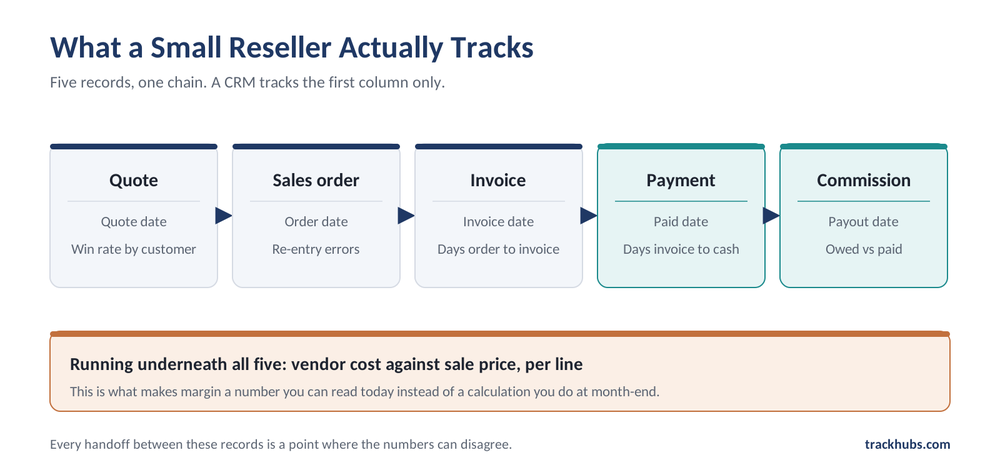
The Five Things a Small Reseller Should Track
Quotes
Track every quote, not just the ones that convert. Quote volume against conversion tells you which customers are worth quoting and which are using you as a price check. If quotes live in Word documents or an email thread, this data does not exist.
Good quoting software for small business use should pull line items from a catalog rather than requiring manual entry, so pricing is consistent across reps and the quote becomes a structured record instead of a document. TrackHubs’ AI Quote Assistant starts from the inputs a reseller actually receives, a supplier quote or a customer request uploaded or pasted, checks the lines against the catalog, and returns a draft quote for a person to review before it goes out.
Sales orders
The sales order is the hinge. It is where a won quote becomes an obligation to fulfill and a right to invoice.
Sales order management matters because this is the stage where re-keying causes the most damage. A quantity typed wrong here flows into the invoice, the vendor purchase order, and the commission calculation before anyone catches it.
Invoices and payment status
Track not just what was invoiced, but the gap between order date and invoice date, and between invoice date and payment. Reliable invoice and payment tracking turns those two gaps into your cash conversion cycle. Most small resellers can feel when it slips. Few can show it as a number.
Cost, profit, and margin
Revenue is the easy number. Margin requires holding vendor cost against sale price on every line, and it is the number that decides whether a busy quarter was a good one. If margin is only calculable at month-end in a spreadsheet, you are steering by a rearview mirror. Keeping margin visible on every line is what makes the difference actionable.
Commissions
Commission owed, commission paid, and the basis for each. For teams paying commission on collection rather than on booking, this also means tracking which invoices have actually cleared.
Why the Spreadsheet Method Fails at a Predictable Point
Spreadsheets work fine for a two-person operation. They fail somewhere around the point where a second rep joins, or a second contract vehicle is added, or a customer disputes a commission.
The failure is rarely dramatic. It looks like this:
- The same order exists in three places with three slightly different totals
- Nobody is certain which spreadsheet version is current
- Month-end reconciliation takes two days that were supposed to be selling days
- A commission dispute has no auditable answer, so it gets settled by whoever argues harder
- Margin erosion is discovered a quarter after it started
None of these is a problem you can solve by buying a better spreadsheet. They are all symptoms of the same underlying issue: the data is entered more than once, so it can disagree with itself.
How Automatic Reporting Actually Works
This is the part the CRM roundups skip.
When quotes, orders, invoices, and payments live in one system, reports stop being something you assemble and start being something you filter. The data is already structured and already related. A full reporting suite turns a profit report from a monthly project into a date range and an export.
What can be generated automatically
For a US reseller, the reports that come out of a connected system typically include:
- Cost and profit per sales order and per invoice, with vendor cost held alongside sale price
- Performance by rep, showing total sales and commission owed
- Sales by organization and by catalog category
- Vendor payment status, showing what is paid, open, and due
- State reports, including sales orders and invoices by state, plus sales tax and invoice tax totals per state
That last one is the one small resellers most often still do by hand. If you sell into multiple states, sales tax reporting software functionality is not a nice-to-have. It is the difference between a filing that takes an afternoon and one that takes a week. In TrackHubs, state and tax reports are included with the Track Scale plan, while the core invoice, cost/profit, and organization reports start on Track Grow.
What automation does not do
It does not file your returns, and it does not replace an accountant. It produces the totals, broken out the way a filing needs them, and exports them. Someone still reviews and files. Any vendor promising more than that is worth a second look.
It also does not fix bad data. A system that automates reporting on incorrectly entered orders will produce incorrect reports faster.
Common Questions
Do I need a CRM and sales tracking software, or can one tool do both?
It depends on where your work sits. If your revenue depends on long, relationship-led pursuit of new logos, you need a CRM. If it depends on turning inbound requests into accurate quotes and getting paid, a quote-to-cash system covers more of the actual job. Some teams run both, with the CRM ahead of the quote.
How do I track sales for a small business without buying software yet?
Start with one spreadsheet, not several, and record quote date, order date, invoice date, payment date, sale price, and vendor cost on every line. If you can maintain that discipline, you will have the data to evaluate software properly later, and you will likely find the pain point that justifies it.
Can accounting software handle this?
Accounting software handles invoicing and payment well. It generally does not handle quoting from a contract catalog, and it does not calculate sales commissions on collection. Most small resellers end up with accounting software plus a quoting tool plus a commission spreadsheet, which is the patchwork this article is about. TrackHubs is built to replace that patchwork, and it syncs invoices with QuickBooks Online so your accounting stays where it is.
Is this only for bigger teams?
No. The problem starts at two or three people, because it is caused by handoffs between records rather than by headcount. A solo reseller quoting from a contract catalog and paying one commissioned rep already has the full cycle to manage. TrackHubs plans start at one user with quoting and sales orders, and commission management comes with the Track Control plan and above.
Does this apply if I sell to government agencies?
It applies more. Government resellers carry contract-specific pricing and contract designations that must be right on every quote, plus an expectation of an audit trail. Both are difficult to maintain in spreadsheets.
What to Look For When You Evaluate
A short checklist, weighted for a reseller rather than a general small business:
- Does data flow forward without re-entry? Quote to order to invoice to commission should be conversions, not retypes.
- Is margin calculated, not derived? Vendor cost should be a field, not something you work out afterward.
- Does it handle your contract pricing? If you sell on contract vehicles, the contract-mapped catalog needs to reflect that, with SIN mapping if you hold a GSA Schedule.
- Can you configure your own statuses and terms? A system that forces someone else’s workflow will get worked around.
- Does reporting include tax by state? If you sell across state lines and it does not, you have not solved the reporting problem.
- Is there a real audit trail? Who changed what, when. This settles commission disputes and satisfies contract requirements.
- Can you control who sees margin and commission data? Not everyone on the team should.
The Point of Tracking Is Acting Sooner
Every reseller eventually knows what happened. The question is when. Month-end reporting tells you about a margin problem after a month of it. Real-time visibility tells you during.
Sales tracking software for small business use is worth the change only if it moves that timeline forward. If it produces the same numbers at the same speed with a nicer interface, it has not earned the migration.
If you want the stage-by-stage version of this, the companion guide, The Quote-to-Cash Process for Resellers and Distributors, walks the full cycle. If you are comparing software categories rather than process stages, Quote-to-Cash vs CPQ vs Commission Software covers where each one starts and stops.
See Your Own Numbers in One Place
The quickest way to judge whether connected tracking would change anything for your team is to watch one order move through it: quoted from a catalog, converted to an order, invoiced, and the margin visible the whole way. Book a demo and bring a real order you would normally track across three tabs.
Prefer to try it yourself first? See pricing and save 50% for 3 months, and run one of your own quotes through it.